


How to Cancel Fiscal Representation in Portugal

Most clients appoint a fiscal representative in Portugal because they need one — they are non-residents with property, a car, a job or other Portuguese tax obligations. But situations change. If you have become a Portuguese tax resident, or you no longer have Portuguese tax obligations, you can cancel fiscal representation. This guide walks through how to cancel fiscal representation Portugal step by step: when you can do it, what to update on Portal das Finanças, and how to set up electronic notifications instead. For the service itself, see our fiscal representation service.
Can I cancel?
| You can cancel if… | You cannot cancel if… |
|---|---|
| You have become a Portuguese tax resident | You are a non-EU citizen, still a non-resident, self-employed in Portugal |
| You have closed all your Portuguese tax obligations | You have unresolved tax filings or pending notices from AT |
| You stay a non-resident and switch to electronic notifications | You have not yet updated your tax address on Portal das Finanças |
You can cancel if you have become a Portuguese tax resident (you live in Portugal and have a Portuguese tax address), you have closed all your Portuguese tax obligations — sold property, closed your bank account, ended freelance activity — or you remain a non-resident and switch to electronic notifications instead.
You cannot cancel if you are a non-EU citizen who is still a non-resident and self-employed in Portugal — Portuguese law then requires a fiscal representative even with electronic notifications — or you have unresolved tax filings or pending notices from Autoridade Tributária, or you have not yet updated your tax address on Portal das Finanças.
Step-by-step process
Here is how to cancel fiscal representation in Portugal:
- Update your tax address on Portal das Finanças. Before you can cancel, your tax address (domicílio fiscal) must reflect your current residence — a Portuguese address if you became a tax resident, or your foreign personal address if you stay a non-resident and switch to electronic notifications. If you have become a tax resident, Portuguese law gives you 60 days from the change of residence to update — this is the 60-day rule. See how to update your address on Portal das Finanças; AT’s official guidance is in the Morada (Domicílio Fiscal) section of info.portaldasfinancas.gov.pt.
- Activate electronic notifications (if you stay a non-resident). If you remain a non-resident and switch from a representative to no representative, activate electronic notifications (NCEPF) on Portal das Finanças. Autoridade Tributária then delivers all tax correspondence to your account instead of to your previous representative’s address. This step is not required for clients becoming Portuguese tax residents — they receive correspondence at their new Portuguese address. The portal walkthrough with screenshots is below.
- Notify your fiscal representative. Email us or submit a cancellation request through the client portal. Include your NIF and the effective date of cancellation. We confirm the cancellation with Autoridade Tributária and stop forwarding correspondence; your annual subscription will not be renewed.
- Confirm with Autoridade Tributária. Log in to Portal das Finanças and verify that your tax address shows your current address and that your fiscal representative is no longer listed. If anything still shows your old representative, contact us so we can clear it with AT.
Doing it yourself on Portal das Finanças
If you prefer to activate electronic notifications and ask Autoridade Tributária to end the representation directly, this is the portal walkthrough. You need your NIF document and your Portal das Finanças password — see how to log in to Portal das Finanças if you have not used the portal before.
Activate electronic notifications (Gerir Canais)
-
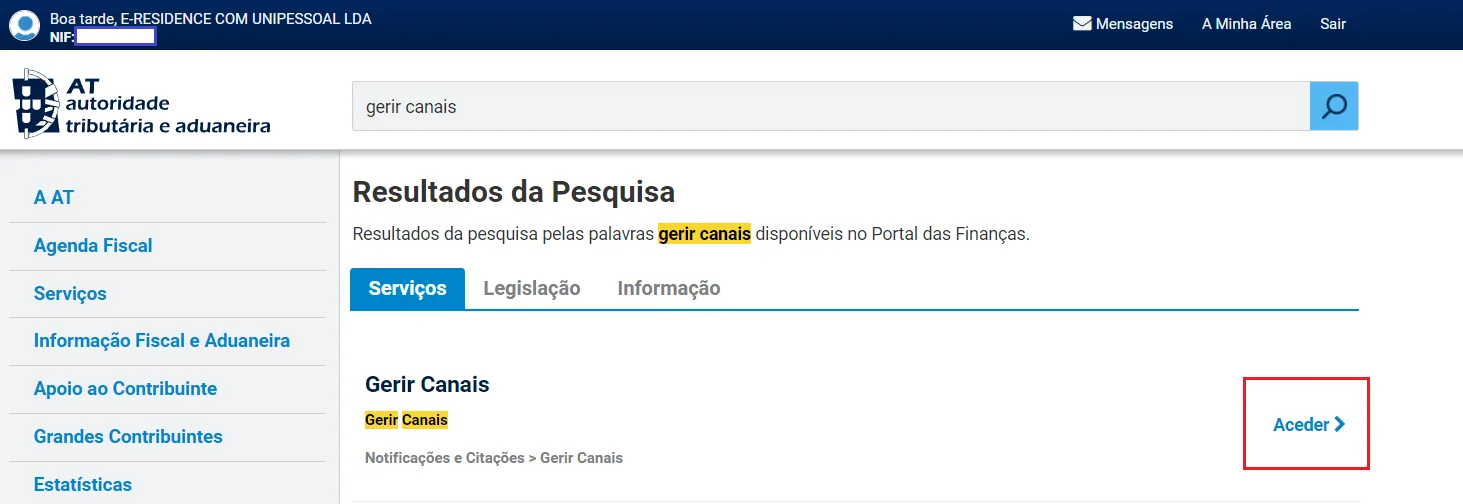
Search for “Gerir Canais”. After logging in, type “gerir canais” in the search bar at the top of the page and click “Aceder” next to the “Gerir Canais” result (Notificações e Citações > Gerir Canais).
-
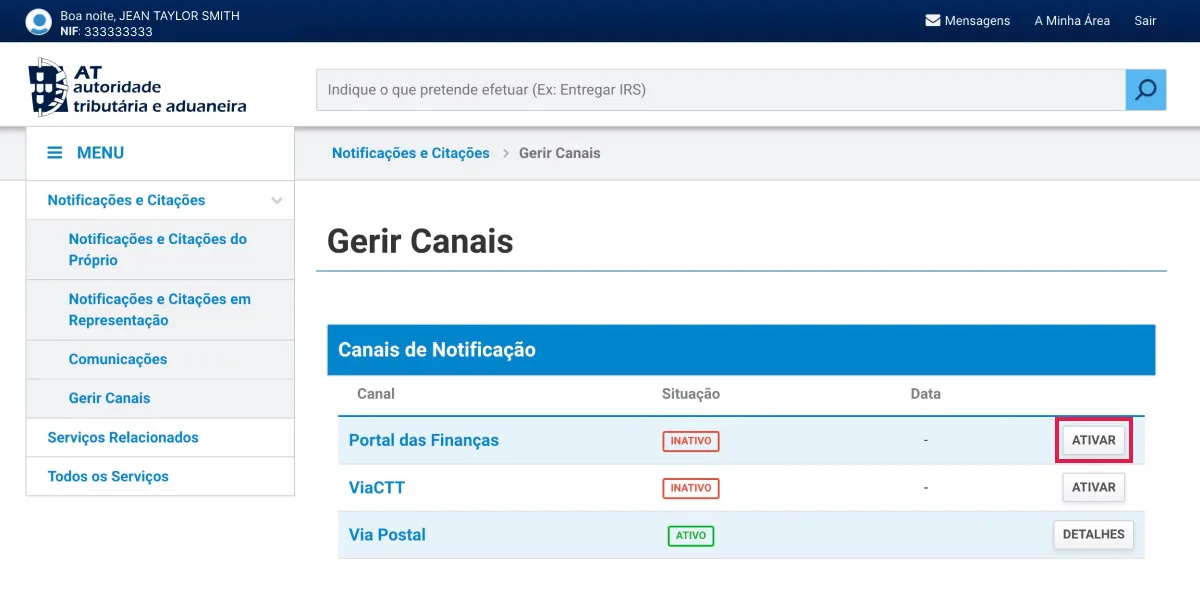
Activate the Portal das Finanças channel. In the “Canais de Notificação” section, find “Portal das Finanças” and click “Ativar”. The status changes from “Inativo” to “Pendente Ativação” (pending activation).
-
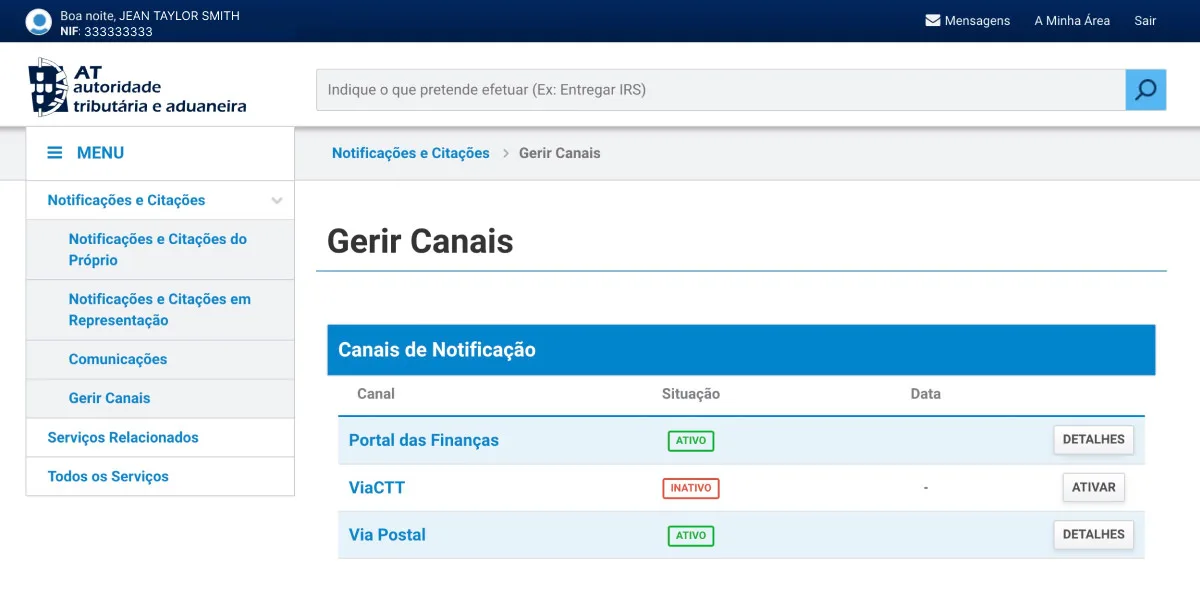
Confirm the activation. Log out and log in again. Once the Portal das Finanças channel shows “Ativo”, take a screenshot — you attach it to the cancellation request below.
Ask AT to cancel the representation through e-balcão
-
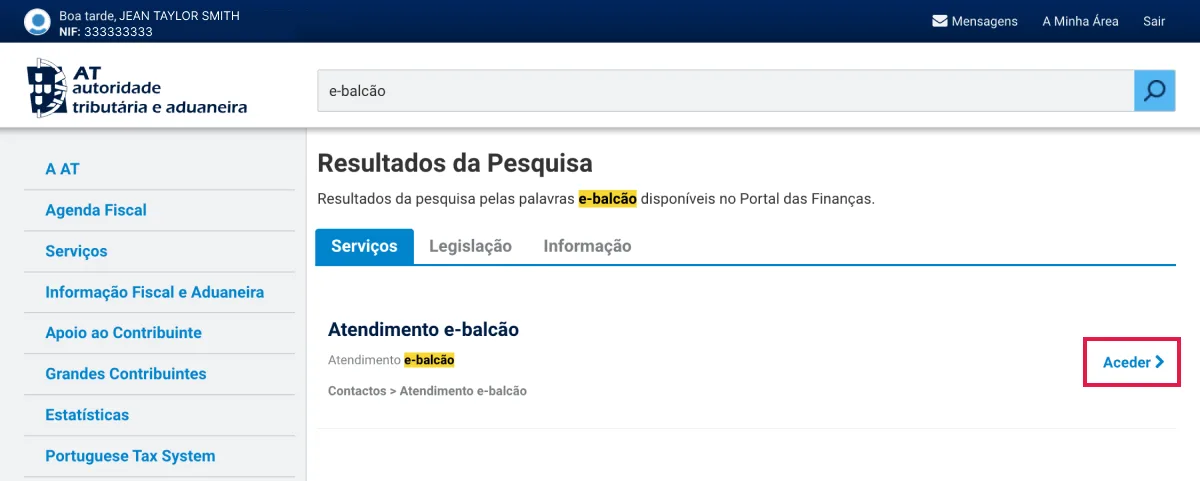
Open e-balcão. Search for “e-balcão” in the search bar and click “Aceder” next to “Atendimento e-balcão” — the online help counter of Autoridade Tributária.
-
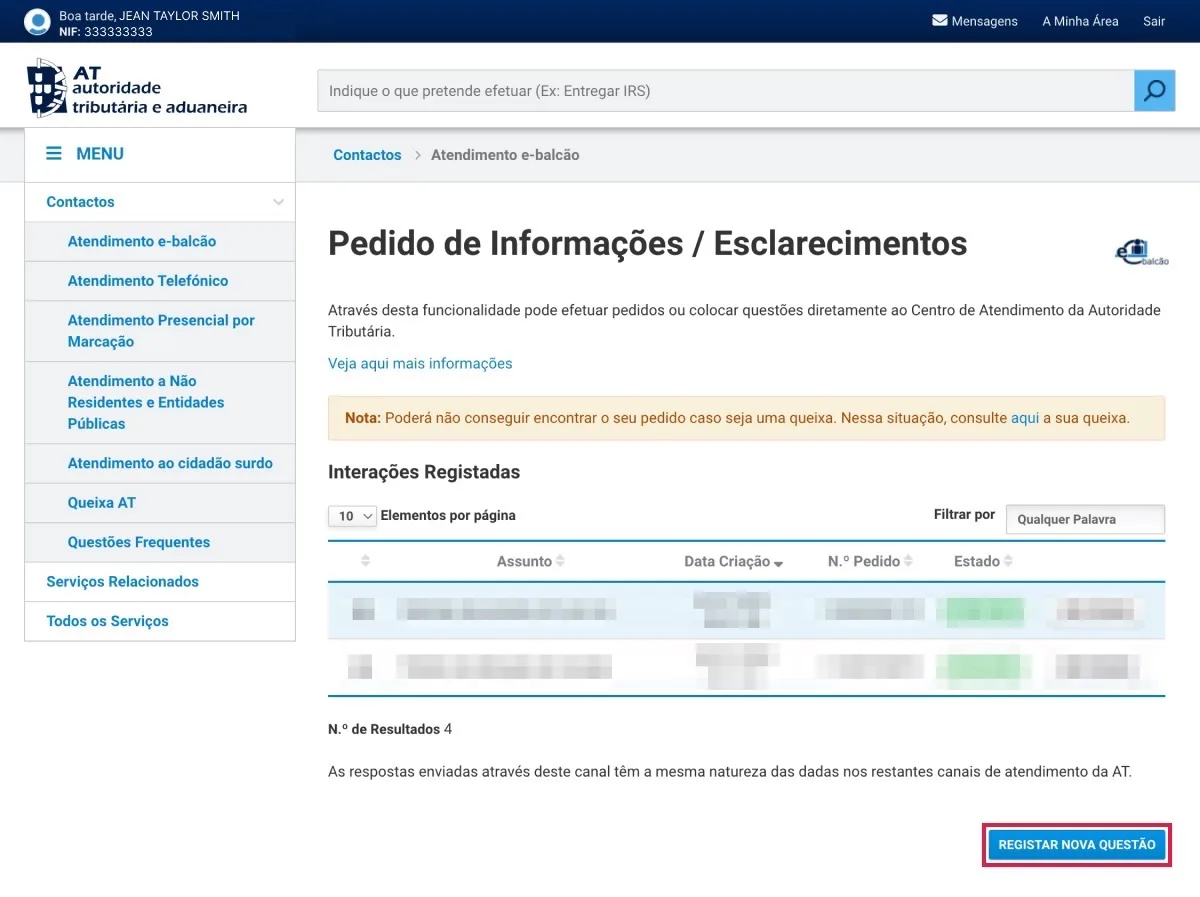
Register a new request. Under “Pedido de Informações / Esclarecimentos”, click “Registar Nova Questão”.
-
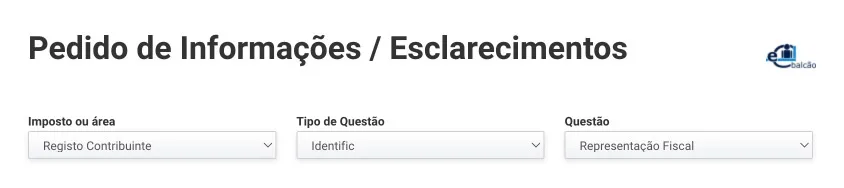
Choose the subject of the request. In the dropdown menus select “Imposto ou área” — Registo Contribuinte; “Tipo de Questão” — Identific; “Questão” — Representação Fiscal.
-
Answer “Não”. When the portal asks “Alguma destas responde às suas dúvidas?” (does any of these answer your question?), choose “Não”.

-
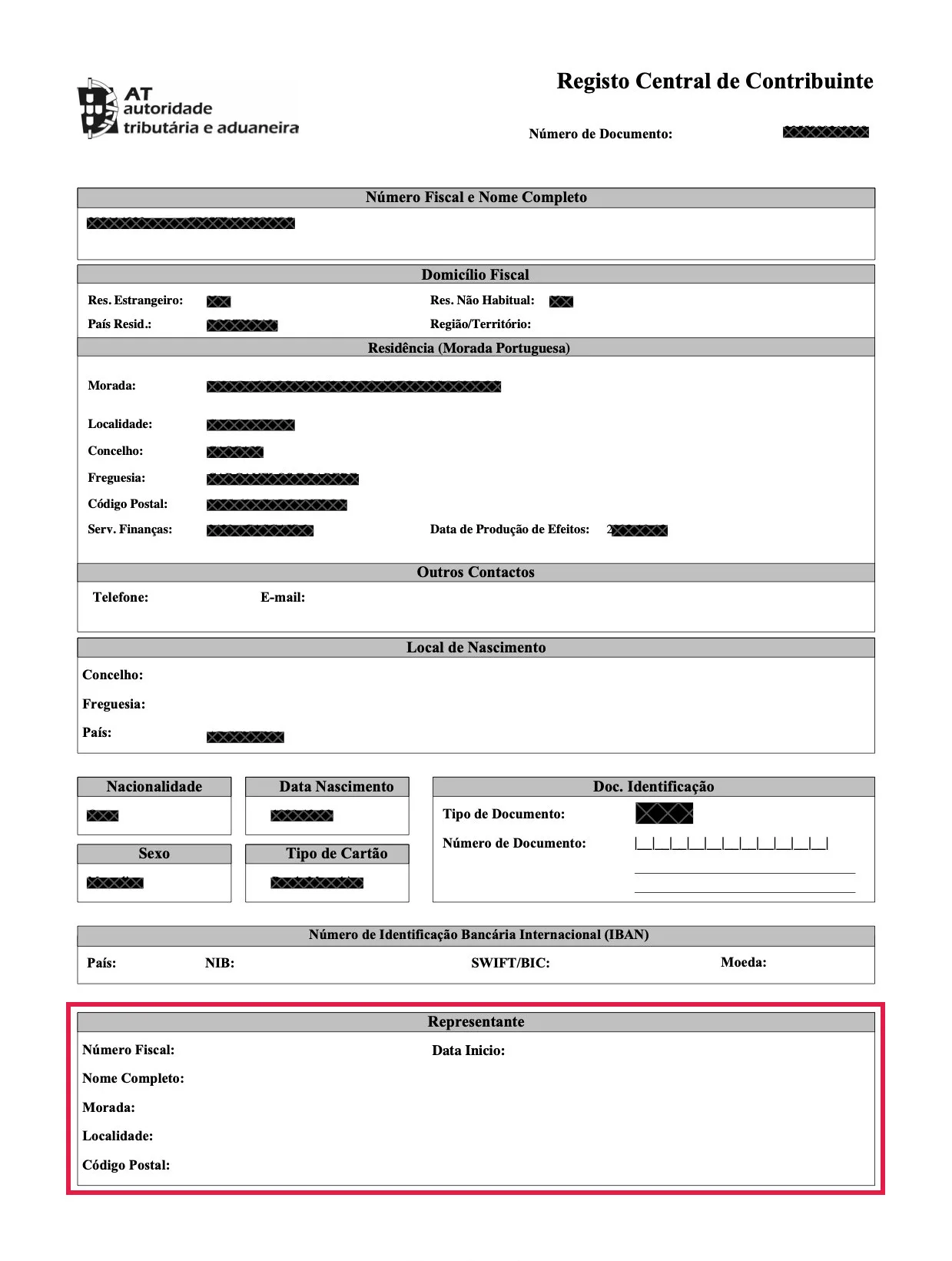
Fill in the subject and the message. Copy the text from the box below into the “Assunto” and “Mensagem” fields and replace the parts in brackets. Your fiscal representative’s name and NIF are on page 1 of your NIF document, under “Representante”.
-
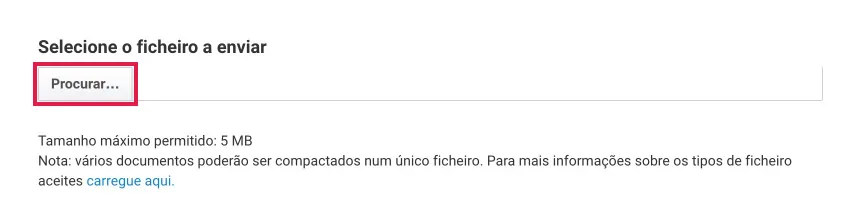
Attach the screenshot. Under “Selecione o ficheiro a enviar”, click “Procurar” and upload the screenshot of the “Ativo” status you took earlier.
-
Submit the request. Click “Registar Questão”. Allow one to two business days for AT to answer before moving on to the next part.
Text for the request. Replace [your fiscal representative’s name], [your fiscal representative’s NIF], [your current country of residence] and [your name]:
Assunto: Cancelamento de Representação Fiscal
Mensagem:
Prezado(a), bom dia!
Espero que esteja bem.
Solicito o cancelamento de [your fiscal representative’s name] - TIN [your fiscal representative’s NIF] como meu representante fiscal.
Vivo actualmente em [your current country of residence]. Ativei as notificações eletrónicas no portal, e não tenho obrigações fiscais em território português.
Muito obrigado pela sua assistência e tenha um bom dia.
Cumprimentos,
[Your name]
In English: “Dear Sir/Madam, good morning! I hope you are well. I request the cancellation of [your fiscal representative’s name] - TIN [your fiscal representative’s NIF] as my fiscal representative. I currently live in [your current country of residence]. I activated the electronic notifications in the portal, and I have no tax obligations in the Portuguese territory. Thank you very much for your assistance and have a nice day. Best, [Your name]“
Download your updated NIF document
-
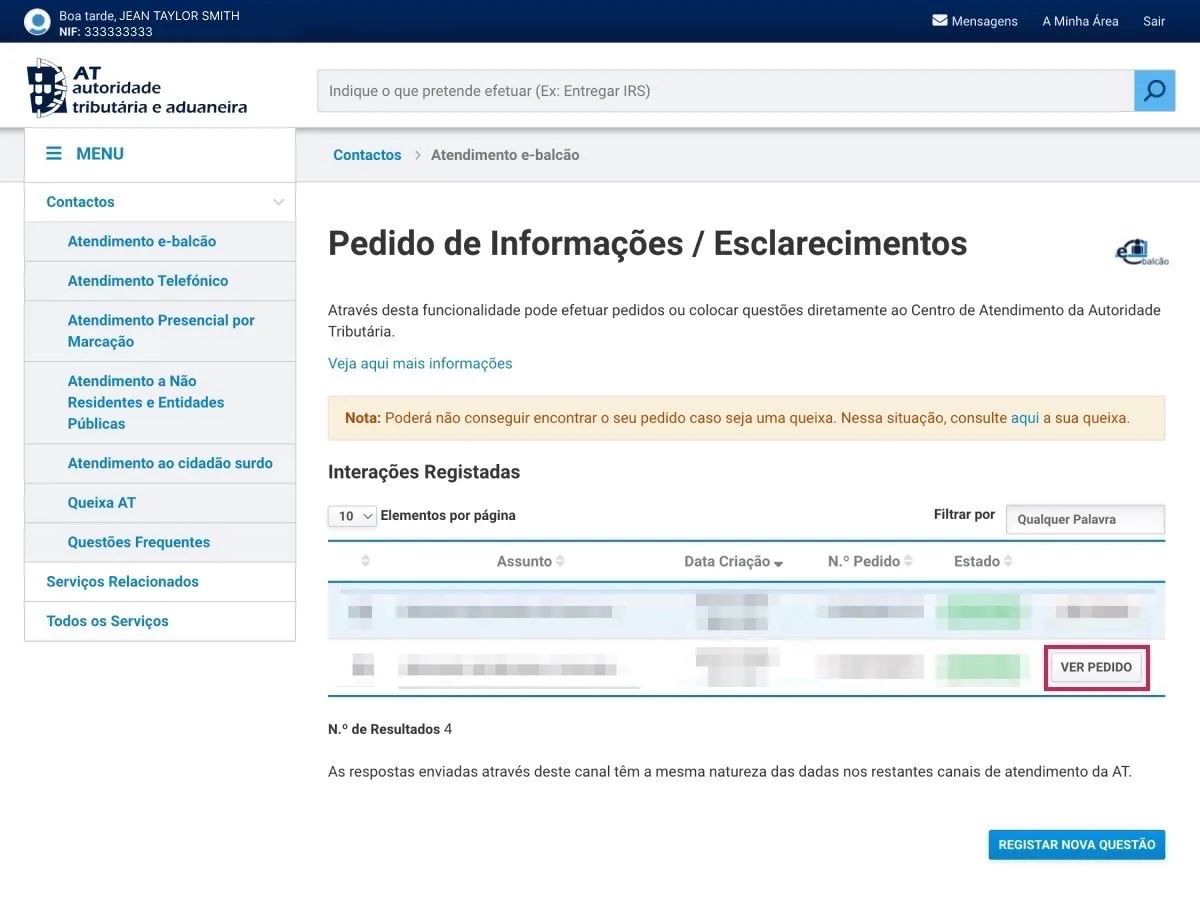
Open AT’s reply. Log in again, go to e-balcão (search “e-balcão”, then “Aceder”) and, under “Interações Registadas”, click “Ver Pedido” on your request.
-
Download the new NIF document. If the cancellation went through, your updated NIF document is attached to AT’s reply. Its “Representante” section should be empty.
What happens after cancellation
- Autoridade Tributária sends all future tax notices to your tax address on file — your Portuguese address or your Portal das Finanças account, depending on your setup.
- Your annual subscription is closed — no further renewals.
- Your NIF remains valid for life — cancelling representation does not affect your NIF.
- You can reappoint a fiscal representative later if your situation changes.
Frequently Asked Questions
When can I cancel fiscal representative Portugal?
You can cancel if you have become a Portuguese tax resident, closed all your Portuguese tax obligations, or you remain a non-resident and switch to electronic notifications instead. Non-EU non-residents who are self-employed in Portugal cannot cancel: they need a representative even with electronic notifications.
What happens if I don't update my tax address within 60 days?
Portuguese law requires you to update your tax address within 60 days of becoming a tax resident. Missing this deadline can lead to fines from Autoridade Tributária. Update your address as soon as you have settled in Portugal — see how to update your address.
Do I need to provide proof of residence to cancel?
For non-EU citizens becoming tax residents, Portal das Finanças may require proof of your new Portuguese address — typically a Título de residência from AIMA (the migration agency that replaced SEF in 2023). EU/EEA citizens can use a CRUE for EU citizens from their local Junta de Freguesia. The full list of accepted proof of address documents is in our separate guide.
Does cancelling fiscal representation affect my NIF?
No. Your NIF remains valid for life. Cancelling fiscal representation only changes how Autoridade Tributária delivers your tax correspondence — it does not affect your NIF number. You can reappoint a representative later if your situation changes.
Can I ask Autoridade Tributária to end my fiscal representation myself?
Yes. Log in to Portal das Finanças, activate the Portal das Finanças channel under "Gerir Canais", then open e-balcão and register a request (Registo Contribuinte > Identific > Representação Fiscal) asking AT to cancel your representative, with a screenshot of the active notifications attached. When AT answers, your updated NIF document is attached to the reply and its "Representante" section is empty.
Start your case
Need help cancelling your fiscal representation?
If you have become a Portuguese tax resident, our Cascais team can guide you through the cancellation and confirm it with Autoridade Tributária.
Contact our team- Confirm your situation qualifies
- Update your tax address first
- We confirm cancellation with Autoridade Tributária
Reviewer and Sources
Reviewed by: E-Residence Team · Last updated:
Procedural references reflect the current rules of Autoridade Tributária e Aduaneira and the 60-day tax residency update rule, as of May 2026. Cancelling fiscal representation has tax-residency implications. If you are unsure whether your situation qualifies, or whether you should remain a non-resident or transition to tax resident, consult a qualified Portuguese tax adviser before making the change.
Official sources
- Autoridade Tributária e Aduaneira — info.portaldasfinancas.gov.pt (Domicílio Fiscal)
- Portal das Finanças — Notificações Eletrónicas (NCEPF)