


















How to check and confirm invoices in e-Fatura: Portugal guide for expats
In this article

When you give your Portuguese NIF at a shop, clinic or service provider, the invoice can later appear in e-Fatura. That does not mean every record is ready to use without a check. Some are already classified; some need a sector selected; some do not arrive at all. If you are self-employed, the personal-versus-professional question adds another decision.
This guide is for the buyer-side task: checking, registering and classifying invoice records. It is not a guide to issuing a fatura-recibo to a client, and it does not decide whether a cost is deductible in your individual situation.
The official e-Fatura service lets consumers validate invoices issued with their tax number, consult deduction-related information and register records that were not communicated by issuers. The Tax Authority offers the service through the e-Fatura app and the Portal das Finanças. See the official e-Fatura overview before relying on a screen label or annual date.
Start by separating two different tasks
| If your question is… | This is the right owner |
|---|---|
| “How do I issue a document to a client for work I have done?” | Our guide to issuing recibos verdes in Portugal |
| “How do I file the annual IRS return, step by step?” | Our Portuguese guide on how to file IRS in Portugal |
| “Is an invoice issued to me present and correctly classified in e-Fatura?” | This guide |
| “Can someone help prepare my annual Portuguese IRS return?” | E-Residence Portugal annual tax return service |
A receipt you issue to a client and a purchase invoice issued to you can both contain familiar Portuguese tax terms. They are still different workflows. Do not use the buyer e-Fatura screen as a substitute for issuing your own client document.
Where to check invoices in the Portal das Finanças
The official buyer FAQ gives this route in Portuguese:
e-Fatura > FATURAÇÃO > ADQUIRENTE > VERIFICAR FATURAS
It also lists the e-Fatura app as a way to view your invoices. The exact screen language can change, so use the Tax Authority’s current buyer FAQ as the source of truth if the navigation no longer matches.
When reviewing a record, do not select a category from the merchant name alone. Compare it with what you actually purchased and with the category choices the portal presents for that issuer.
What “pending information” usually means
Many records are processed automatically. The Tax Authority’s FAQ identifies two circumstances in which an invoice can be pending: the issuer has several registered economic activities, or the buyer carries on a professional activity. Where the issuer has several activities, AT does not receive the description of the goods or services in the communicated consumer-invoice data, so it may not be able to assign the purchase to the correct sector automatically.
Your task is narrower than “optimising” a deduction: identify the sector that matches the real purchase from the options available for that issuer. The official deductible-expenses FAQ explains why multi-activity issuers can create pending records.
A useful check before you select anything
- Open the individual invoice record.
- Check the issuer and the purchase you actually made.
- Use only a sector that the portal makes available for that issuer.
- If the record combines purchases that belong to different sectors, do not assume the portal can split it the way you expect. Keep the invoice and use the official route or professional advice for your case.
The portal can show an amount under a sector without proving that your eventual personal tax result will be the same. Eligibility, household position and the annual return are separate questions.
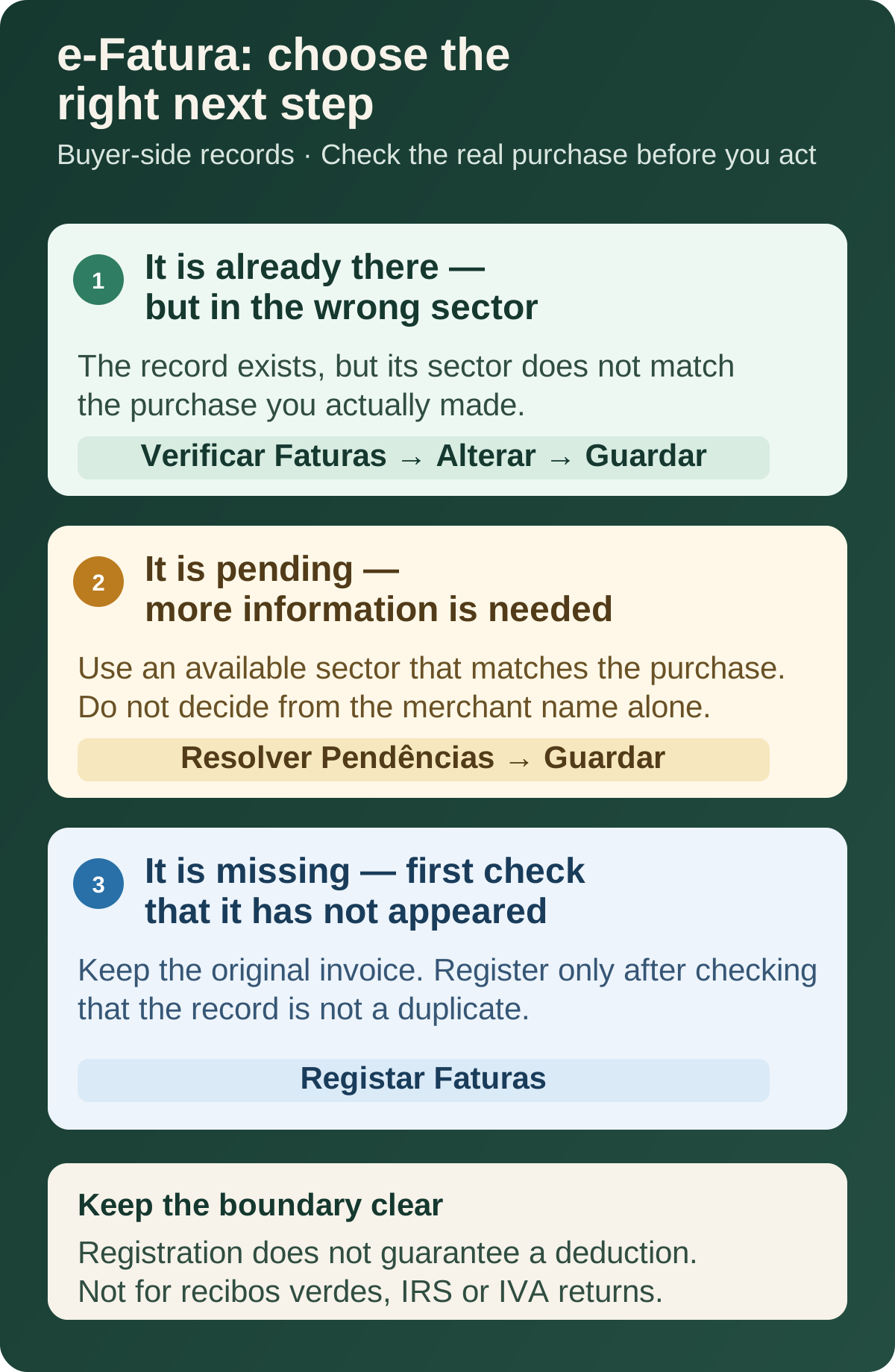
A record is present but in the wrong sector
That is different from a missing invoice. The buyer FAQ describes this route for an existing record:
FATURAÇÃO > ADQUIRENTE > Verificar Faturas > Alterar > Guardar
Use it to correct a classification only after checking the real purchase. AT also says that, for an individual document, you can only select a sector in which the issuer is registered. Do not use a manual registration to “correct” a record that is already present.
If an invoice with your NIF is missing
For invoices issued from 1 January 2023, issuers must communicate invoice data to AT by the fifth day of the following month. The buyer FAQ says that, once communicated, the information becomes available to the buyer. It also describes a route to register a record that is not available:
e-Fatura > FATURAÇÃO > ADQUIRENTE > Registar Faturas
The e-Fatura app has a Registar option as well. Do not register a second copy merely because you have not checked yet: first confirm whether the record has already appeared. The official FAQ also describes what to do when the information you entered is later matched by issuer data, and how to remove a record if required.
Keep the original invoice or other supporting record. Recording a missing item in e-Fatura is not a guarantee that it creates a deduction; it preserves the record for the official workflow.
Foreign invoices: a limited route, not a general upload area
Expats often assume that any receipt paid abroad belongs in e-Fatura. The official buyer FAQ is more limited: it describes “FATURA EMITIDA NO ESTRANGEIRO” for invoices relating to health, education and housing expenses. The route is shown after:
e-Fatura > FATURAÇÃO > ADQUIRENTE > Registar Faturas
Use that route only where it applies to the type of expense stated by AT. Keep the invoice and recheck the current official guidance if the expense was incurred in another EU or EEA country, the document is unusual, or you are unsure whether it belongs in the annual IRS workflow.
Health invoices that ask for a prescription
A health invoice may need more than a category choice. For health expenses subject to the standard VAT rate, the Tax Authority says that the taxpayer must associate the relevant medical prescription and confirm the amount supported by that prescription.
That is why “pending” can be a prompt for evidence rather than a portal error. Do not declare that you have a prescription unless you have one that supports the relevant expense. The official e-Fatura guide shows this as a separate action.
If you are self-employed: classify, then keep the boundary clear
For a freelancer or sole trader, e-Fatura is not just a household-invoice list. AT says that buyers who carry on a professional activity must classify the invoices so the system can identify whether an expense relates to that activity. Its buyer FAQ names the pending-record route as e-Fatura > FATURAÇÃO > ADQUIRENTE > Resolver Pendências. A purchase can be wholly professional, partly professional or outside the activity.
Use the information you actually have. Do not mark a personal expense as professional simply because it could be useful in a business context. Conversely, do not assume that a professional classification completes a VAT return or confirms a personal IRS deduction. The Tax Authority’s registration and classification guide distinguishes the e-Fatura classification task from the separate IVA workflow.
If what you need is to issue a client invoice rather than classify a purchase, return to the recibos verdes guide. Keeping those two tasks separate makes the portal easier to use and reduces avoidable errors.
The annual timing: validate, review, then distinguish a complaint from filing
The enduring statutory sequence is:
| Stage | What to do | Official timing frame |
|---|---|---|
| Check and validate invoice records | Resolve pending records and register an eligible missing record where AT permits it | By the end of February in the following year |
| Review the deductions calculated by AT | Check the deduction information made available in the Portal das Finanças | By 15 March in the following year |
| Challenge relevant omissions or inaccuracies | Use the official complaint route where it applies | By 31 March in the following year |
The calendar is not always a simple date copy-paste. For IRS 2025, the Tax Authority’s 2026 calendar moved the end-of-February invoice deadline to 2 March 2026 because the legal deadline fell on a non-business day, and set 16–31 March 2026 for checking deductible expenses and complaints. Treat that as a dated example, not a forecast for the next campaign. Always check the current IRS deadlines calendar before acting.
If you missed the validation window, not everything is lost: health, education, property costs and care-home expenses can be declared or corrected manually in Box 6C1 of Annex H of the return — with the obligation to evidence the amounts and keep the invoices for four years. What you cannot do is expect the portal to reopen validation after the deadline.
A complaint about expenses does not automatically pause the deadline for filing or paying an annual tax return. The current official calendar says this explicitly for the 2026 campaign.
Need private help with your annual Portugal IRS return?
After you have checked your e-Fatura records, E-Residence can help with the separate annual-return process. The service is private assistance, not the Tax Authority or the e-Fatura portal.
A short monthly routine that reduces February pressure
- Ask for your NIF on a purchase invoice when that is appropriate for you.
- Check e-Fatura periodically instead of waiting for the annual deadline.
- Deal with pending information while you still remember the purchase.
- Keep invoices that you registered yourself, corrected or used to support a classification.
- If you work independently, separate the question “is this for the activity?” from “how do I issue a document to my client?”.
- Recheck the Tax Authority’s annual calendar before the IRS campaign.
Official sources
- Autoridade Tributária — e-Fatura consumer overview
- Autoridade Tributária — e-Fatura buyer FAQ
- Autoridade Tributária — deductible expenses and e-Fatura FAQ
- Autoridade Tributária — register, classify and validate invoices (PDF)
- Autoridade Tributária — IRS 2025 main deadlines in 2026 (PDF)
Frequently asked questions
Is e-Fatura the same as issuing recibos verdes?
No. This e-Fatura guide is about invoices issued to you as a buyer and the expense records used in the IRS workflow. Recibos verdes are issuer-side documents for work you sell to a client.
Where can I check my invoices in e-Fatura?
The Tax Authority’s buyer FAQ gives the Portal das Finanças route as e-Fatura > FATURAÇÃO > ADQUIRENTE > VERIFICAR FATURAS. The official e-Fatura app is another option.
What does a pending invoice mean?
A record can be pending when the issuer has more than one registered activity and AT cannot assign the expense to the right sector automatically. Check the real purchase before choosing a sector.
What if an invoice with my NIF is missing?
For documents issued from 1 January 2023, issuers report invoice data to AT by the fifth day of the following month. If the invoice is still unavailable, AT describes registration through the e-Fatura app or e-Fatura > FATURAÇÃO > ADQUIRENTE > Registar Faturas.
Can I register any foreign invoice in e-Fatura?
No. AT’s buyer FAQ describes the foreign-invoice route for health, education and housing expenses. Do not treat that route as a general upload function for every foreign receipt.
Why does a health invoice ask about a prescription?
For health expenses subject to the standard VAT rate, AT says the taxpayer must associate the medical prescription and confirm the relevant expense amount.
I am self-employed. Do I need to classify invoices?
Yes. AT says self-employed taxpayers must classify invoices because a purchase can be personal or professional. Identify whether the expense relates totally or partly to the activity; classification does not by itself prepare an IRS or VAT return.
When is the annual e-Fatura deadline?
The statutory frame is the end of February in the following year for invoice validation, with AT making calculated deductions available by 15 March and a complaint deadline by 31 March. Check the current official calendar because a non-business day can move a deadline.
I missed the invoice validation deadline. What happens?
Health, education, property costs and care-home expenses can be declared or corrected manually in Box 6C1 of Annex H of the IRS return, with the obligation to evidence the amounts and keep the invoices for four years. The annual complaint window does not reopen the validation deadline.
When do invoices with my NIF appear in e-Fatura?
Issuers communicate invoices to AT by the fifth day of the month after issuance, and after that, invoices with a NIF become available on your personal page by the end of the month following issuance, per the official deductible-expenses FAQ.