


















Número de soporte: where to find it on your TIE, green certificate or NIE
In this article
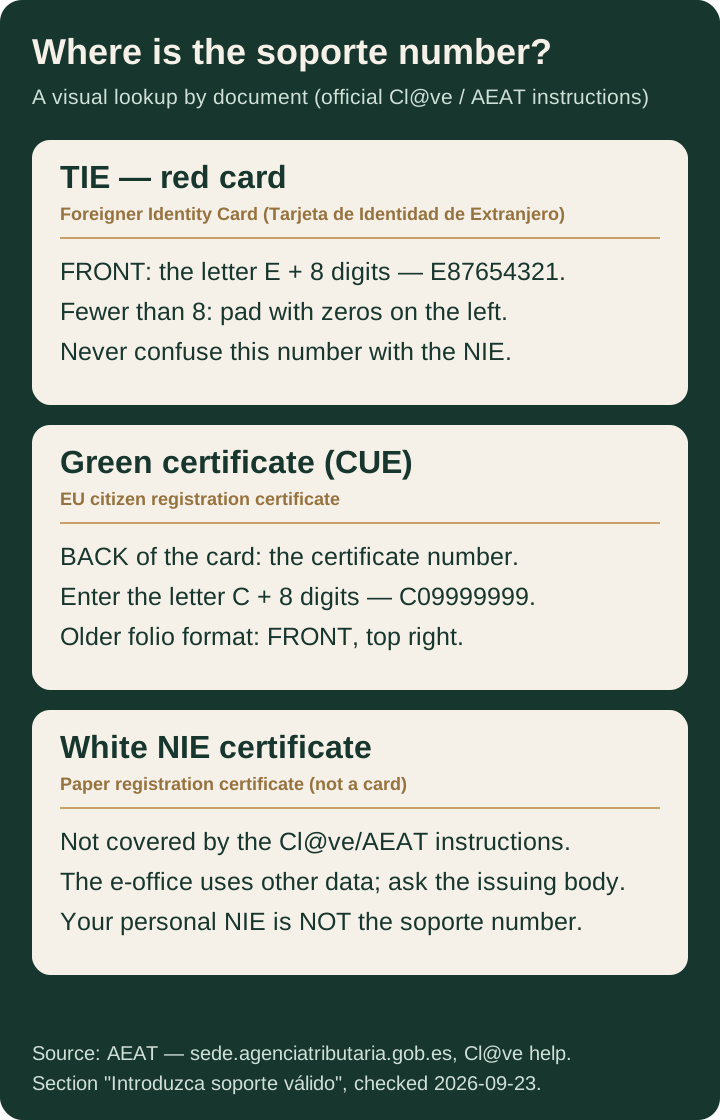
Short answer. The soporte number identifies the document, not the person. On the TIE (red card) it sits on the front: the letter E followed by 8 digits. On the green EU citizen certificate it is on the back of the card and is entered with the letter C in front. Your personal NIE is not a soporte number: do not enter it in its place.
What the soporte number is — and what it is not
The soporte number identifies the physical support — the card or certificate you present to identify yourself. The official Cl@ve help page of the Spanish Tax Agency invokes it when an e-office form asks you to “enter a valid soporte”: the system checks that the number matches the document type you selected.
The NIE, by contrast, identifies the foreign person. The distinction matters: a foreigner can have a NIE assigned and, at the same time, several physical documents — a TIE card, a green certificate — each with its own soporte number. What a form asks for is the number of the document you are going to use, not the NIE printed on your certificate.
The soporte number on the TIE (red card)
The Tarjeta de Identidad de Extranjero (TIE) — the red plastic card — is the most direct case. According to the official Cl@ve instructions and the Ministry of Justice:
- the soporte number appears on the front of the card;
- it consists of the letter E followed by 8 digits (for example,
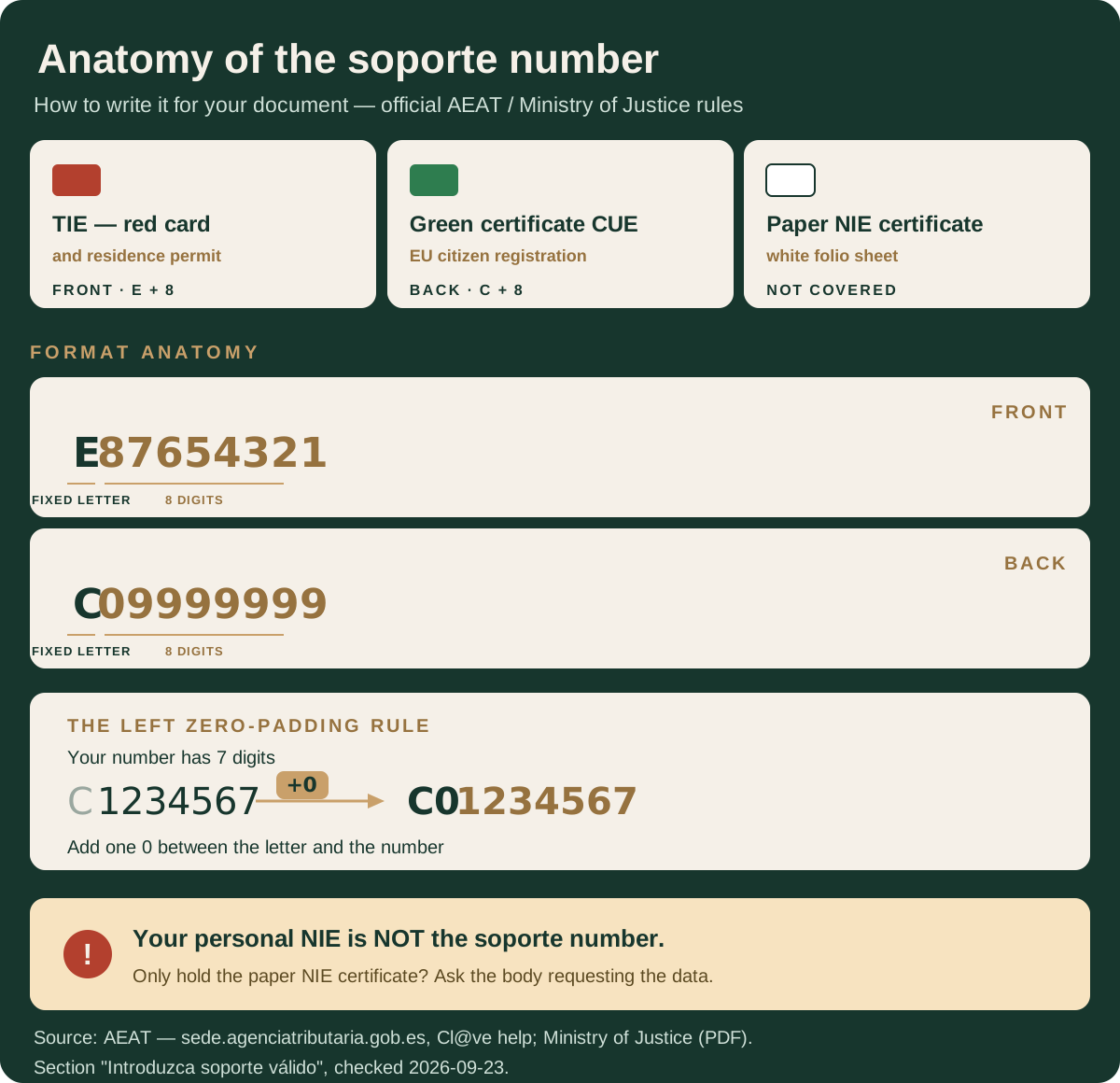
E87654321); - if your number has fewer than 8 digits, it is padded with zeros on the left up to 8.
The same rule applies to a residence permit in card format: front, letter E, 8 digits.
The soporte number on the green certificate (CUE)
The EU citizen registration certificate — the “green paper”, nowadays also issued as a card — follows its own rule:
- on the card, the certificate number is on the back;
- it is entered preceded by the letter C, followed by the 8 digits of the number;
- if the number has fewer than 8 digits, it is padded with zeros on the left: a certificate numbered
9999999is entered asC09999999; - on older folio (paper) certificates, the certificate number — which is the soporte number — appears on the front, top right.
The Ministry of Justice publishes this rule with the same example: a certificate whose soporte number is 1234567 must be entered as C01234567.
Paper NIE certificate: what to do when your document does not fit
The official soporte instructions cover three document types: the DNI, the foreigner card or residence permit, and the EU citizen registration certificate. A paper NIE certificate — the white sheet issued by the National Police when the number is assigned — is not a card and does not appear in any of those three boxes.
If an e-office form asks for a soporte number and all you have is that certificate, do not guess the field: check with the body requesting the data (e-office, bank, gestoría) and confirm which number your document should supply. Reusing the number from another document or inventing a format is the fastest way to a rejection.
Quick table: your document and its soporte number
| Document | Soporte number format | Where it is | How to enter it |
|---|---|---|---|
| TIE (red card) | Letter E + 8 digits | Front of the card | E87654321; fewer than 8 digits → pad with zeros |
| Residence permit (card) | Letter E + 8 digits | Front of the card | Same as the TIE |
| Green CUE certificate (card) | Letter C + 8 digits | Back of the card | C09999999; fewer than 8 digits → pad with zeros |
| Green CUE certificate (old folio) | Certificate number | Front, top right | Letter C + the number padded with zeros |
| Spanish DNI | Depends on version: 3 letters + 6 digits (AAA123456), or the number under “NUM SOPORTE” | Front | Spanish citizens with a DNI only |
| Paper NIE certificate | Not covered by the support instructions | — | Ask the body requesting the data |
When you will be asked for this number
The Cl@ve help page describes the most common case: a government e-office asks for the soporte number when you register or identify yourself with your document, and the system checks that the entry matches the chosen document type. If the field is rejected, review the leading letter and the zero padding before assuming your document is the problem.
This guide does not cover other contexts — immigration forms, banks, municipal registers — because each body defines which datum it wants. When a form mentions a “soporte number”, use the number of the document you are presenting in that procedure and confirm with that portal’s own official help.
Common mistakes when entering the number
- Entering the NIE instead of the soporte number. They are different identifiers: the NIE identifies the person, the soporte number identifies the document.
- Omitting the leading letter. The TIE carries an E in front; the green certificate, a C. Without the correct letter the field does not validate.
- Skipping the zero padding. A 7-digit number is not submitted as-is: it is padded with a zero on the left, exactly as the official examples show.
- Using the number from another document. If you hold several documents, each has its own soporte number; the valid one belongs to the document you are using in that procedure.
Frequently asked questions
Is the soporte number the same as the NIE?
No. The NIE identifies the person; the soporte number identifies the physical document (card or certificate) that contains it. One holder can hold several documents, each with its own soporte number, and the official instructions ask for the one on the document you use to identify yourself.
Where is the soporte number on the TIE?
According to the official Cl@ve help page of the Spanish Tax Agency, the soporte number on a foreigner card appears on the front and consists of the letter E followed by 8 digits, for example E87654321. If your number has fewer than 8 digits, pad with zeros on the left.
Where is the soporte number on the green EU citizen certificate?
On the EU citizen registration certificate in card format, the number is on the back and is entered with the letter C in front; if it has fewer than 8 digits, pad with zeros on the left (a certificate numbered 9999999 is entered as C09999999). On older folio (paper) certificates, the number appears on the front, top right.
What soporte number do I enter if I only have a paper NIE certificate?
The Cl@ve and Ministry of Justice support instructions describe the DNI, the foreigner card or residence permit, and the EU citizen registration certificate. For a paper NIE certificate that matches none of those formats, ask the body requesting the data: do not invent a format or reuse the number from another document.
Why does the e-office reject my soporte number?
Common mistakes are entering the NIE instead of the soporte number, omitting the letter that matches your document, or failing to pad with zeros on the left when digits are missing. Check the exact format in the official Cl@ve help and retry with the number from your own document.
Choose your next step
Verify the data yourself. The Cl@ve help page of the Tax Agency and the Ministry of Justice instructions describe the soporte number of each document with examples. To read the NIE printed on the same documents, the NIE format guide explains the letter-digit-letter structure.
Do you need the document itself? E-Residence does not issue or manage soporte numbers: they are data printed on your documents. If you do not yet have a NIE or your card, start with applying for the NIE number or see how to book a NIE appointment; for EU citizen registration, see the registration certificate (NIE Verde). If you are sorting out which document proves what, NIE vs TIE in Spain separates the two roles. An enquiry does not replace the authority or decide a case.
Editorial note. Document formats and official portals can change. Re-check the official help on the day you fill in a form.
Official sources
- Spanish Tax Agency (AEAT) — Cl@ve help: “Introduzca soporte válido” (how to enter the soporte number) — card front E + 8 digits, EU certificate back with letter C, old folio format on the front top right.
- Ministry of Justice — e-office: “Cómo introducir el número de soporte” (PDF) — electronic DNI AAA123456, foreigner card E87654321, EU certificate C01234567, and older folio certificates.
- National Police — NIE assignment procedure — form EX-15 and the Modelo 790 Código 012 fee receipt, cited as context for the procedures where the document appears.