















Example of a NISS Document: Where the Number Appears and How to Get It
The 11-digit NISS appears on the Social Security assignment letter, on the back of the Citizen Card and in your Segurança Social Direta account. To get your proof, check your NISS request in the Social Security portal and complete biometric verification. The NISS is not the NIF, which is the tax number.
In this article
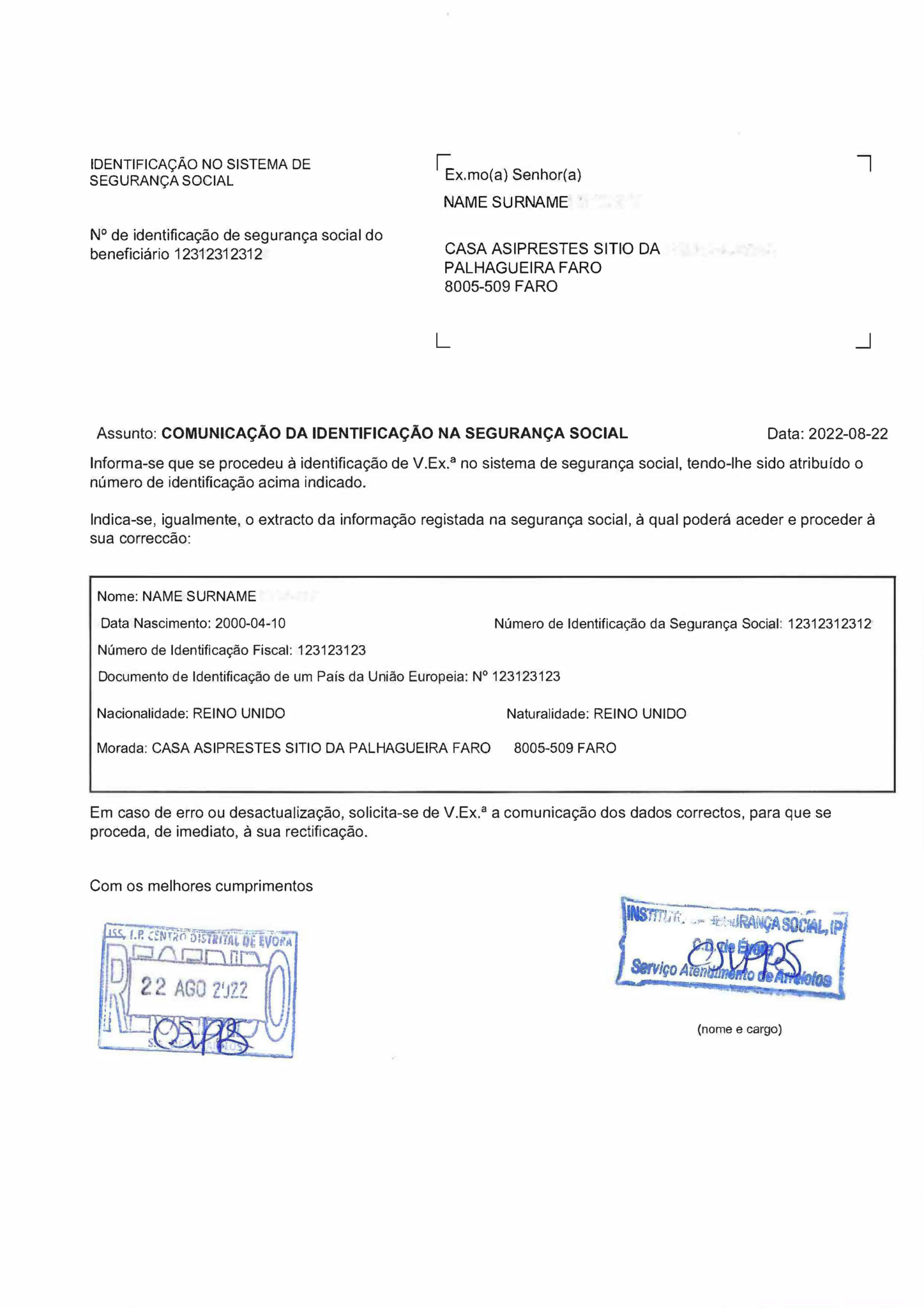
The image below is an older example of a Portuguese NISS assignment letter, dated 2022. It helps you recognize the type of proof, but it is not a current official template. Segurança Social can change the layout and the way the proof is made available.
What is visible in this older example
The NISS appears twice: at the top left, next to “Nº de identificação de segurança social do beneficiário”, and in the data box, labeled “Número de Identificação da Segurança Social”. The number shown is a sample and has 11 digits. The letter is headed “Comunicação da identificação na Segurança Social” and carries Instituto da Segurança Social stamps.
The data box also shows a name, date of birth, tax number, identity-document details, nationality, place of birth and address. Those are observations about the 2022 example only. They are not a universal list of fields for every proof issued today.
The letter’s central purpose is to communicate the Número de Identificação da Segurança Social (NISS) assigned to the holder. Gov.pt defines the NISS as the number used to access rights and fulfill duties before Portuguese Social Security.[1]
If you share your own proof with an employer or adviser, first check why it is needed. Cover the NISS and other personal data before posting a copy publicly.
NISS vs NIF: what is the difference?
The NIF is the 9-digit tax number assigned by the Autoridade Tributária and used for taxes, banks and contracts, while the NISS is the 11-digit Social Security number used for contributions, work and benefits. If you still need the tax number, see our NIF online guide and the NIF document example; for the NISS application itself, read the NISS guide for Portugal.
Where the NISS appears and how to get each document
| Document | Where the NISS appears | How to obtain it |
|---|---|---|
| NISS assignment letter or proof | At the top left and in the personal-data box, as in the 2022 example | Consulta do Pedido de NISS in the Social Security portal, after the number is assigned[2] |
| Citizen Card (Cartão de Cidadão) | On the back of the card | Only if you hold a Citizen Card; a foreign resident without one requests the NISS from Social Security[1] |
| Segurança Social Direta account | In the personal data of your profile, after you log in | Create the account on the Segurança Social Direta portal with your NISS[5] |
| Payslip and employment contract | Usually in the employee identification details | Provided by your employer |
How to obtain your own proof
The current Instituto da Segurança Social guide directs applicants to Consulta do Pedido de NISS after assignment. The steps are:
- Open Consulta do Pedido de NISS in the Social Security portal and enter the request ID, the email associated with the request and the holder’s date of birth.[2]
- Complete biometric verification to obtain the proof.[2]
- If biometric verification cannot be completed, use video-assistance or an in-person Social Security service.[2]
- If you applied directly, follow the instructions displayed for your request rather than assuming that Segurança Social uses one universal delivery method.
How E-Residence delivers your NISS
If E-Residence handles your NISS application, we send your NISS in PDF format to the email address and WhatsApp number you provided as soon as it is ready. This describes delivery through the E-Residence service; it does not mean that Segurança Social sends every applicant’s proof by email.
If you have not yet applied for the number, use the official gov.pt NISS service or read our NISS application guide for the broader process.
What the proof does — and does not — establish
The proof confirms that a NISS has been assigned to the holder. Keep its scope separate from other records:
- Employment: NISS assignment alone does not establish that a particular employment relationship has been registered.[2]
- Contributions: contribution history is consulted separately in the Social Security portal under the contributory-career record.[4]
- Benefits: having a NISS does not by itself establish eligibility or approval for a particular benefit; each benefit has its own conditions and process.[1][2]
- Healthcare: the SNS national user number is a different identifier. Even where eligible foreign residents can request the NIF, NISS and SNS number together, the three numbers remain distinct.[3]
Related guides
- NIF online in Portugal: how to request the tax number, the other number most people need.
- NIF document example: where the NIF appears on the Autoridade Tributária proof.
- NUSS in Spain: the Spanish counterpart of the NISS, if you are moving between the two countries.
Frequently asked questions
Where can I find my NISS?
Your NISS appears on the Social Security assignment letter, on the back of the Citizen Card, in the personal data of your Segurança Social Direta account and, usually, on your payslip and employment contract. It has 11 digits. If you have none of these documents, check the status of your request in the Social Security portal.[2]
Is there a NISS card?
The NISS is not issued on a card of its own that you have to request. The number appears on the assignment letter, on the Citizen Card if you have one, and in Segurança Social Direta. If a bank, employer or landlord asks for a “NISS card”, ask whether it accepts the assignment proof or the Citizen Card.
What is a NISS certificate?
“NISS certificate” is the everyday name for the assignment proof: the letter or document that confirms your number. It is different from a statement of contributory standing (declaração de situação contributiva), which concerns your position with Social Security. Ask whoever requests it which document it accepts before ordering either one.
Is the image on this page the current official NISS format?
No. It is an older example dated 2022. The layout and delivery route can change, so do not use the image to authenticate another document or as a checklist of fields that every current proof must contain. For your own proof, follow what Segurança Social shows for your request.
How do I obtain proof of my NISS after it is assigned?
Use Consulta do Pedido de NISS in the Social Security portal and follow the instructions shown for your request. The current ISS guide describes biometric verification in the normal route and video-assistance or in-person service if that verification cannot be completed.[2]
What does proof of NISS establish?
It confirms that a NISS has been assigned to the holder. It is not, by itself, proof of registered employment, contributions paid, approval for a benefit, an SNS user number or coverage of healthcare costs. Each of those records is consulted or requested separately.[2][3][4]
Are the NISS, NIF and SNS user number the same?
No. The NISS is the Social Security identifier, the NIF is the tax identifier, and the SNS user number is a healthcare identifier. Some eligible foreign residents can request all three together, but they remain separate numbers. Do not enter one in a form field that asks for another.[1][3]
How many digits does the NISS have, and does it expire?
The NISS has 11 digits, unlike the NIF, which has 9. It is assigned once and stays the same. The letter or PDF that shows it is only proof, so if you lose it, check your request again in the Social Security portal or in Segurança Social Direta.
How will E-Residence deliver my NISS?
If E-Residence handles your NISS application, we send your NISS in PDF format to the email address and WhatsApp number you provided as soon as it is ready. This is the delivery method for our service, not a universal Segurança Social delivery route.
Official sources
[1] Gov.pt — Request a Portuguese Social Security Identification Number (NISS)
[2] Instituto da Segurança Social — Practical guide to requesting a NISS (PDF)
[3] Gov.pt — Combined NIF, NISS and SNS user-number service for eligible foreign residents
[4] Gov.pt — Consult Social Security contribution history
[5] Segurança Social Direta — official Social Security portal